flepiJoueur "Réserviste"489 messages

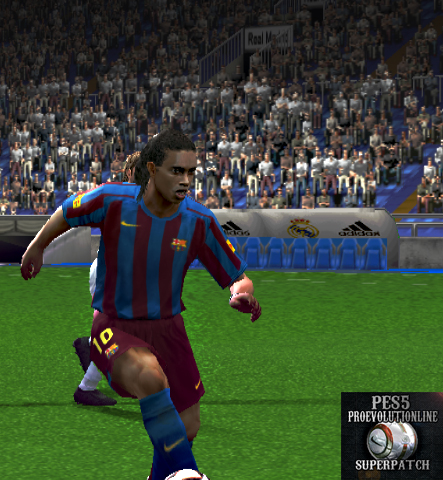
 Nouvelles équipes pour la Coupe du Monde 2006 et la Ligue des Champions 2005/2006 Nouvelles Stats par divers Databasemakers - quelques équipes ont des formations à jour 100 % Compatible Online. Important: Marche uniquement si votre adversaire possèd ce patch ou la même database Nouveaux Stades (Allianz Arena, Veltins Arena, Philips Stadium, St. Jakob Park, Stadio Luigi Ferraris, De la Luz, Maracana, EStadio Dragao, Santiago Bernabeu, Shanghai Stadium) Nouvelles Pelouses + de 500 nouvelles Faces Tous les kits sont dans les .bins Quelques gants pour les gardiens Nouveaux Ballons dont le "Adidas Teamgeist" by Dart Wagner (celui de la coupe du monde 2006) Nouveaux Menus (Toutes Langues) Nouveaux Chants & Sons de célébrations & Musiques dans le jeu Nouveaux Callnames (Toutes Langues) Nouvelles Adboards (Toutes Langues) Nouvelles Banderoles des Supporters
Dont :
English (by ProEvoLutionLine.com)
Deutch (by fch)
Italiano (by ProEvoLutionLine.com)
Espanol (by Niko)
Chinese (by EPT team )
French (by Coolrastaboy)
Il contient :
KITS by :
OPM, Tunevi, Khris22, lrnz90, aizcool , forzaroma, negromota, nt89, Bonaventurastar, Eleanor, Kel, Spark, oppsd', sakax2
FACES by :
Cigman, Dap 019, Doping, Robben 16, Mystiq, emjay, renzobo, norek, s'n
BOOTS by :
capela, FCH, perumaniaco
BALLS by:
Dart Wagner, Spark
UPDATED STADIUMS by :
Ariel Santarelli, nt89, xavier75, acb, ultrasbari, FCH, frenkie
DATABASE by :
PLF, Waldaz, the doctor 46, Andriy, Spooky, FCH, Xavier75
FLAGS MAKER :
fra@230, MaxiMo, FCH
ADBOARDS MAKER :
Frenkie, FCH, ultrasbari, sakax2
MENU MAKER :
stylus, forzaroma, nt89, vladinho, IceBlu, KOC 2000
AUDIO :
Fox ,Zeus ,Aus zweiter Reihe
TECHINCAL SPECIAL CONSULTANT/HELPER :
Ariel Santarelli, Juce , Sobraghe, abScroll, Paul Diddy, Tim 7
Managment/Organisation:
nt89, FCH
Grands mercis à :
abSroll, obocaman, Compulsion, Juce, Walxer, Warpjavier, Tato Waterloo
your are Legends !!!
Installation :
1° :
Sauvegardez/Renommez votre ancien 0_text par 1_text.afs et votre 0_sound.afs par 1_sound.afs, le e_text par z_text.afs et le e_sound par z_sound (ce n'est pas nécessaire étant donné que les fichiers originaux sont présents sur le dvd mais bon, au cas où...)
Tous les fichiers originaux sont présents sur le DVD => /dat :
- e_text.afs
- 0_text.afs
- 0_sound.afs
- e_sound.afs
2° :
Téléchargez DKZ Studio si vous ne l'avez pas :
Download DKZ Studio 0.90 (3.11.05)
3° :
Téléchargez les fichiers à la fin du Topic, extraire les fichiers sur votre Disque Dur :
- Superpatch_0_text.dkz
- Superpatch_e_text.dkz (ou les g,i,s,f selon votre langue)
- Superpatch_e_sound.dkz (ou les g,i,s,f selon votre langue)
- Superpatch Sound.dkz
4° :
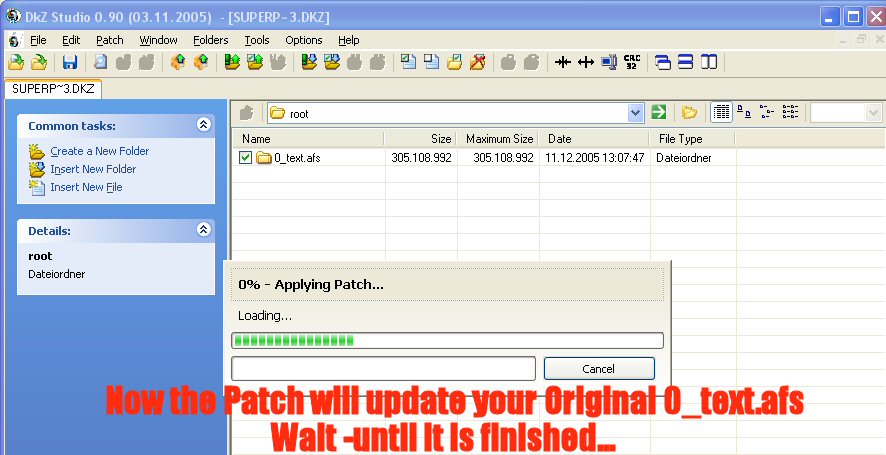
Lancez le Superpatch_0_text.dkz en double cliquant dessus.
Allez dans : Patch --> Apply Patch in Folder
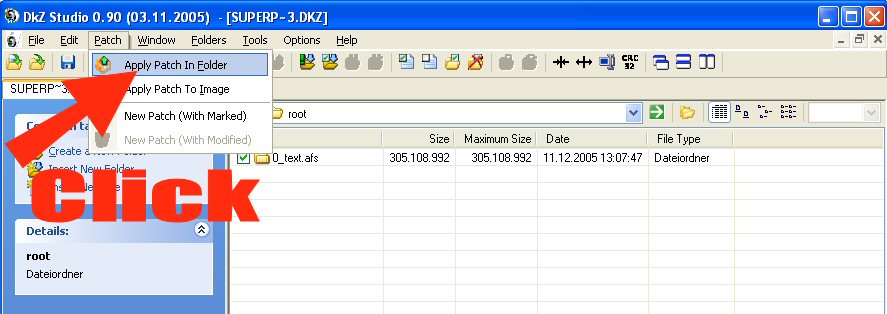
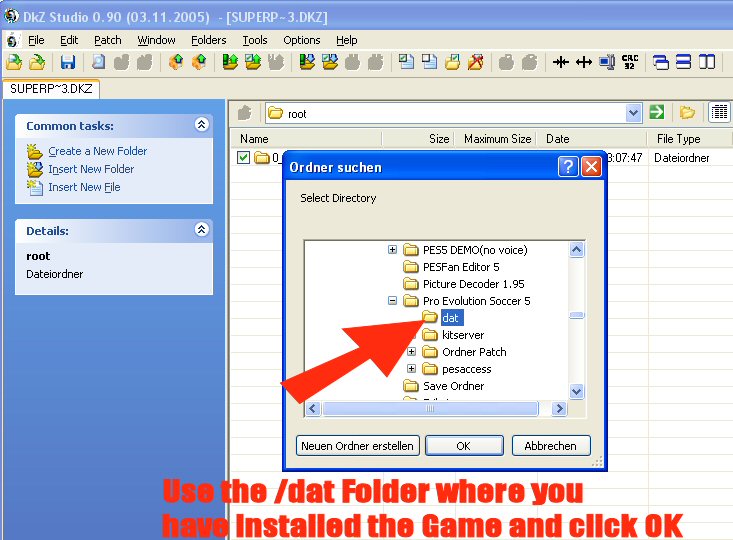
Selectionnez les fichiers dans /dat où le jeu est installé : (par défaut : C:\Program Files\Konami\Pro Evolution Soccer 5\dat)
Maintenant le processus du patch s'éxecute, patientez :
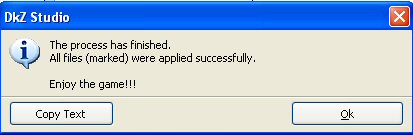
Au final vous avez ça :
Fermez DKZ Studio
Faites exactement la même chose pour les fichiers :
- Superpatch_e_text.dkz (ou les g,i,s,f selon votre langue)
- Superpatch_e_sound.dkz (ou les g,i,s,f selon votre langue)
- Superpatch Sound.dkz
5° : Copiez l'option file dans :
c:\document &Settings\USER\KONAMI\Pro Evolution Soccer 5\save\folder1
6° : Copiez le nouveau pes5.exe(Original) si vous voulez le nom des équipes en ligne.
Maintenant, lancez votre jeu, c'était facile non ?

Liens :
================================================== =================================
Superpatch 0_text DKZ Patch (Kits,Faces,Stadiums,Balls,Boots,Adboards,Flags etc.)
================================================== =================================
Mirror 1 - Rapidshare
Part 1:
http://rapidshare.de/files/9011922/Superpatch_0_text.part1.exe.html
Part 2:
http://rapidshare.de/files/9016334/Superpatch_0_text.part2.rar.html
Vous avez besoin des 2 Parties et lancer le .exe pour extraire le Superpatch 0_text.dkz
================================================== ========================
Superpatch O_Sound DKZ Patch ( All Chants - New Goalsound - Menusounds
================================================== ========================
Mirror 1 - Filefront:
http://files.filefront.com/Superpatch_Soundrar/;4456092;;/fileinfo.html
Mirror 2 - Rapidshare:
Part 1:
http://rapidshare.de/files/8961790/Superpatch_Sound.part1.exe.html
Part 2:
http://rapidshare.de/files/8963441/Superpatch_Sound.part2.rar.html
Part 3:
http://rapidshare.de/files/8962762/Superpatch_Sound.part3.rar.html
Vous avez besoin des Parties et lancer le .exe pour extraire le Superpatch Sound.dkz
English Language Files:
================================================== =========================
e_text.afs (English Ingame Menü & Text) (A télécharger uniquement si vous jouez avec l'installation Anglaise ) Ce fichier n'est pas obligatoire, vous pouvez garder votre f_text.afs !
================================================== =========================
Mirror 1 - Rapidshare:
http://rapidshare.de/files/9017351/Superpatch_e_text.exe.html
Mirror 2:
http://loadup.dr.ag/s/Superpatch_e_text.exe.HtMl
Mirror 3:
http://www.badongo.com/file.php?file=PES+5+Superpatch+e_text__2005-12-12_Superpatch_e_text.exe
================================================== =========================
e_Sound ( English Commentary Callnames & Playername Fix & Superpatch Introsound) (A télécharger uniquement si vous jouez avec l'installation Anglaise)
================================================== =========================
Mirror 1 - Rapidshare:
http://rapidshare.de/files/9017662/Superpatch_e_sound.exe.html
================================================== =========================
f_text.afs (Menus en Français) (A télécharger uniquement si vous jouez avec l'installation Française )===========================================================================
Mirror 1 - WeAreFrenchPC :
http://wearefrenchpc.free.fr/f_text.rar
================================================== =========================
Superpatch Optionsfile (Shop locked -Shop unlocked - Shop locked 90000 Points)
================================================== =========================
Mirror 1:
http://rapidshare.de/files/9028185/Superpatch_Optionsfile.zip.html
Mirror 2:
http://www.badongo.com/file.php?file=Optionsfile+Superpatch__2005-12-12_superpatch+optionsfi.zip
================================================== =========================
Superpatch PES 5 Start (Original!!! - with change Teamnames for Online Gaming
================================================== =========================
Mirror 1:
http://rapidshare.de/files/9028693/PES5_Start_Superpatch.zip.html
Mirror 2:
http://www.badongo.com/file.php?file=PES+5+Start+Superpatch__2005-12-12_pes5+start+superpatc.zip
Tuto: http://forums.evo-web.co.uk/showthread.php?t=27665
Edit by Flo655 pour la traduction et le tuto en français ainsi que l'arrangement du topic
Modifié 4 fois, en dernier le 12 décembre 2005 à 12:34